For plumbers, electricians and anyone who works at the customer’s place. Bill the job on the spot, take the payment, and drive home with nothing left to sort out. No store, catalog or shipping to set up.
Invoices, cash and checks in your Asto account today, in early access · Tap to Pay in the Asto Pro iPhone app, coming to the App Store in the United States
goasto.com/account
9:41
Invoices
Elena Delgado
RP-1001 · today
Drain valve, brassPart$38.00
Sealant tapePart$4.50
Labor, 1.5 hrsLabor$142.50
Amount owed$185.00
Tap to Pay
Email invoice
Mark paid
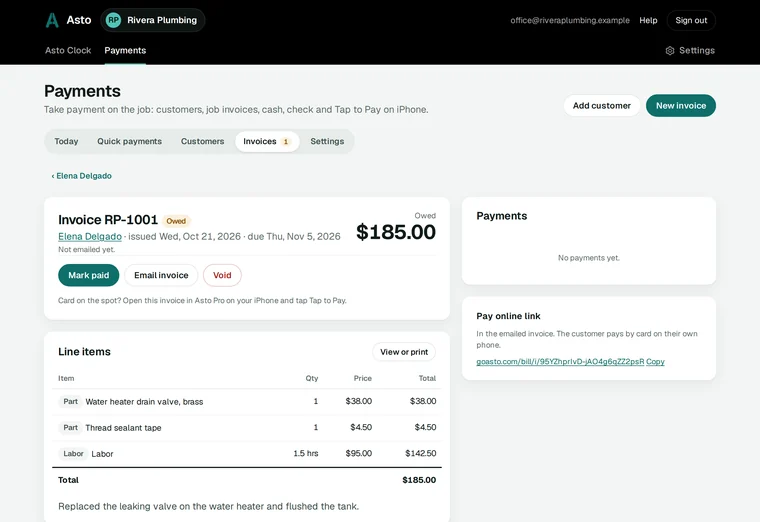
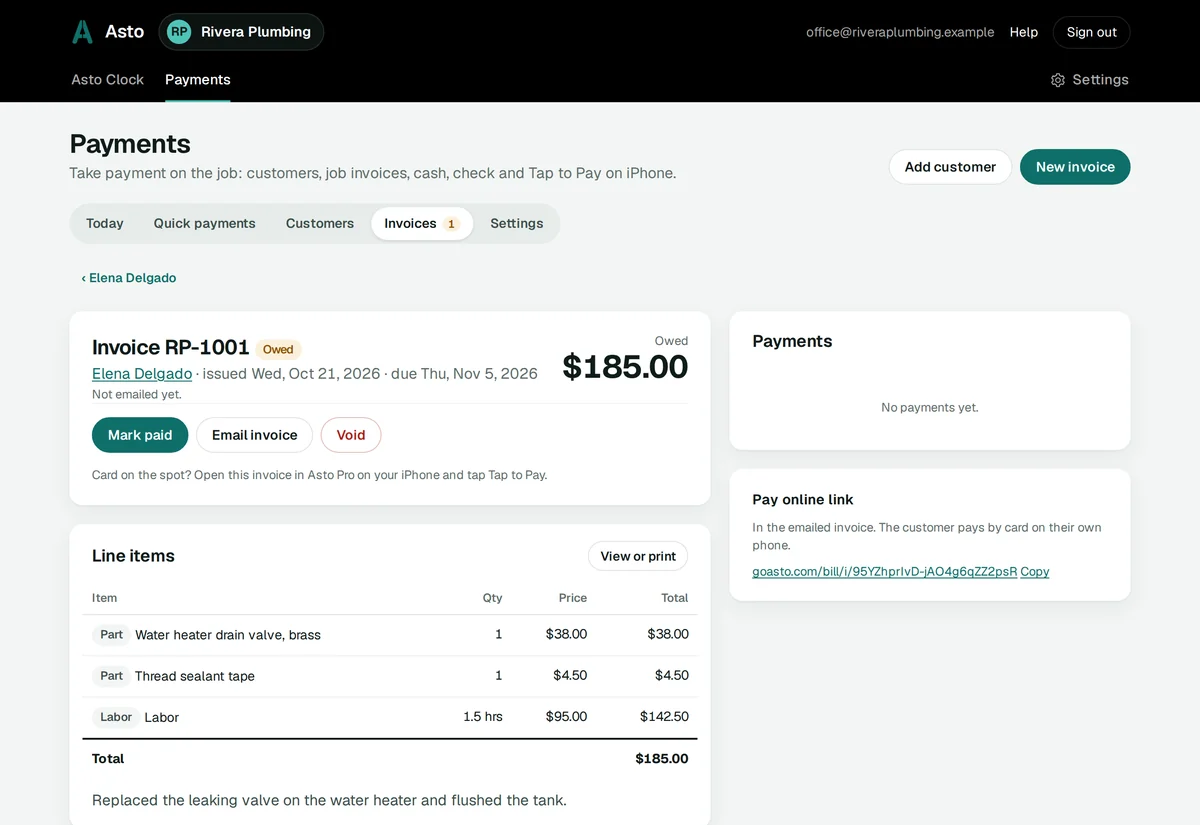
The phone is an illustration. The screen behind it is the real Payments tab.
No more billing at the kitchen table.
The job is done at two in the afternoon. The invoice gets written at ten that night, if you remember what you used. Here is what changes when you bill it before you leave.
Billing at homeWith Asto Payments
Parts and hours written on a receipt, a napkin or your hand.
A line for each part and for your labor, typed in at the job, and the total added up for you.
The invoice goes out days later, and the money comes in weeks later.
Email the invoice before you leave the driveway, with a link to pay online by card.
“I’ll mail you a check.”
Cash or a check marked paid on the spot, or the card tapped on your iPhone for the amount owed.
Cash in your pocket that never makes it into the books.
Every payment kept by day, card, cash and check, with what each job still owes.
Pick the customer from your customers, or add them on the spot: only a name is needed. Add a line for each part you bought, your labor in hours at your rate, and anything else. The total is what the customer owes, and you both see the same number.
Find a customer by name, phone, email or address.
Email the invoice from your business’s name. It carries a Pay online link, so the customer can pay by card on their own phone.
Paid part of it? The rest stays owed on that invoice until it’s paid.
goasto.com/account
Tap to Pay on iPhone
Their card, your iPhone. No reader.
Open the invoice in Asto Pro on your iPhone and tap Tap to Pay. Your customer holds their card or phone near the top of your iPhone, and the amount owed is paid. There’s no card reader to buy, charge or carry.
The money goes straight into your business’s own Stripe account.
A payment counts as paid only when Stripe says it is.
A tap that isn’t finished is canceled after 30 minutes, so it can never be charged later.
The customer gets a receipt by email when you have their email.
ComingTap to Pay comes with the Asto Pro iPhone app, coming to the App Store in the United States.
Paid · $185.00Tap to Pay · into your Stripe
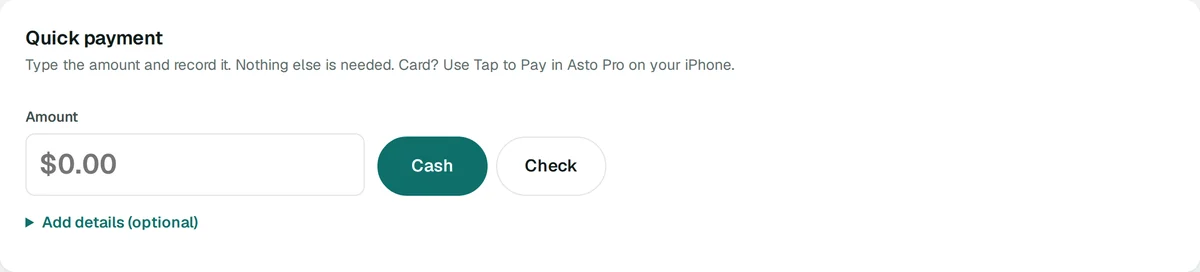
Quick payment
Just an amount. Tap, done.
No invoice needed for a small job. Type the amount and record it as cash or a check, or take it with Tap to Pay. What it was for, the customer and an email for a receipt are all optional, and never asked first.
Every quick payment is stamped with its day and time, in a list of its own, with each day’s total.
Pick a customer and it’s on their account too, without changing what they owe.
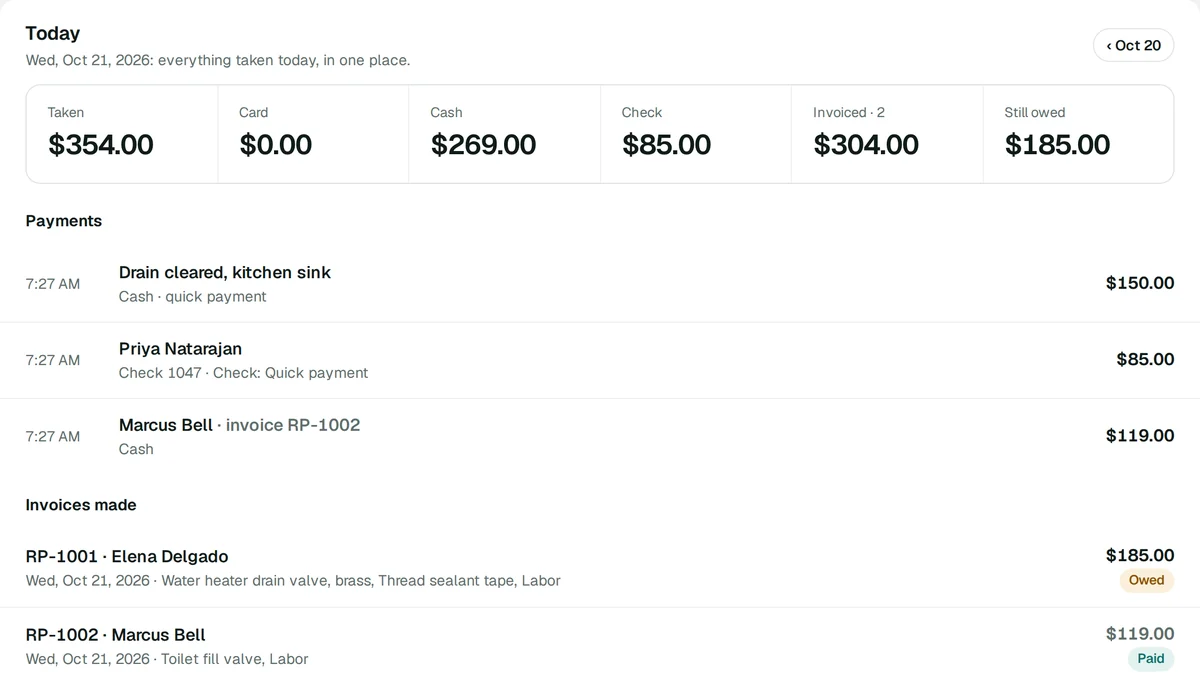
Today
The whole day, already added up.
Everything taken today in one place: card, cash and check, the invoices you made and what’s still owed. Step back through any earlier day. Nothing to reconcile at home that night.
Who it’s for
For work done at the customer’s place.
Plumbers
The valve you bought on the way, the hour it took, paid before you roll up the drop cloth.
Electricians
Parts and labor on one invoice, emailed from the panel.
Heating and air
A service call billed in the driveway, not at the end of the week.
Handymen
Small jobs, quick payments: type the amount and you’re done.
Cleaners and lawn care
Cash or a check marked paid, so the books match the route.
Anyone without a store
No catalog, shop or shipping to set up. Just the customer, the job and the payment.
Getting set up
Four steps, once.
1Turn it onTick Asto Payments in the Products box of your Asto account.
2Connect StripeStripe’s own page asks for your ID and bank. Already set up Stripe for Asto Shop or Bill Pay? Payments uses that same account.
3Add your addressTap to Pay needs your business address, the place you take payments.
4Bill a jobAdd a customer, the parts and labor, and take the payment.
Turn on PaymentsCash, checks and invoices work before Stripe is connected.
At the job. At the office. On their phone.
Your Asto account
In any browser, on a computer or a phone: customers, job invoices, cash and checks, quick payments and the day’s totals.
Early access
Asto Pro on iPhone
The same invoices and customers, plus Tap to Pay for the amount owed.
Coming to the App Store
Your customer
Gets the invoice by email from your business’s name, and can pay it by card on their own phone. No app, no account.
Questions owners ask.
Do I need a store or a catalog?
No. Asto Payments is its own part of Asto Pro and turns on without Asto Shop, a catalog, a store address or shipping. You add the parts and labor for each job as you go.
Where does the money go?
Into your business’s own Stripe account. You connect it once on Stripe’s own page, and if your business already connected Stripe for Asto Shop or Bill Pay, Payments uses that same account.
Do I need a card reader?
No. Tap to Pay on iPhone takes the card on your iPhone itself: your customer holds their card or phone near it. It comes with the Asto Pro iPhone app, coming to the App Store in the United States.
What can I do before the iPhone app is out?
Everything but the tap, in your Asto account in any browser: your customers, job invoices, emailing them with their Pay online link, cash and checks, quick payments and the day’s totals.
Can my crew take payments?
Yes. Give a team member the billing role and they can add customers, make invoices and take payments. A bookkeeper can see it all without changing anything. Settings, payouts and turning Payments on or off stay with you.
How do I give a refund?
In your own Stripe dashboard, where the payment landed. Asto Payments doesn’t make refunds.
Does it add sales tax?
No. Asto Payments is made for services, and your invoice is the parts and labor you enter.
What does it cost?
Asto Payments is part of Asto Pro and is in early access. Stripe takes its own card fees in your Stripe account. Questions? Email [email protected].
Asto Payments
Bill it. Get paid. Drive home.
Turn on Payments in your Asto account and bill your next job before you leave it.
Rivera Plumbing and its customers, in the screens above, are made up, shown in the real Payments tab of an Asto account. Asto is run by Nerd Systems LLC, Houston. Questions? Email [email protected].